
Your pocket
chord machine.
Ersa is a chord synthesizer app for iPhone and iPad. Play chords with touch controls, explore harmony, shape sounds and build loops.

Follow us
Available on the App Store
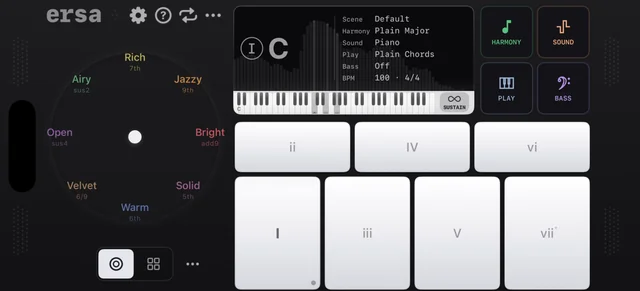
Play · Shape · Loop
A chord instrument you play by touch.
Start with a key and a sound. Tap a pad to hear a full chord, then follow the progression wherever your ear takes you.
Play the whole chord.
Each chord pad plays the notes together. Explore a progression without first learning every piano fingering. Switch to Keyboard, Strips or Octave Grid for a different playing surface.
Give it a different colour.
Move around the Color Wheel to change a chord’s character. Use Chord Builder to choose chord types and extra notes, or explore voicings to hear the same harmony arranged differently.
Loop the part you like.
Add movement with strums, arpeggios and patterns. Record short loops, layer parts, and adjust each track’s volume or mute it while the other parts keep playing.
- Made for
- iPhone & iPad
iOS / iPadOS 17 or later - Short loops
- Up to 8 tracks
About 20 seconds per loop - Play your sounds
- MIDI output
Compatible connection and destination required
Phone or hardware?
Considering HiChord or Orchid?
If what draws you to chord hardware is exploring harmony and catching musical ideas, Ersa offers a way to do that on your iPhone or iPad. These comparisons explain the shared ideas and the differences in controls, sounds, looping and connections.
Ersa vs HiChord
Touchscreen chord pads or a dedicated box with buttons and a joystick? Compare the two ways of playing.
Read the HiChord comparison Explore harmonyErsa vs Orchid
Discover how Ersa’s Color Wheel and Chord Builder compare with Telepathic Instruments’ keyboard and voicing controls.
Read the Orchid comparisonA few useful answers
Before your first chord.
Is there an iPhone alternative to HiChord?
Ersa is an option if you want to play one-touch chords, shape sounds and build short loops on a phone. HiChord is a separate hardware instrument with physical controls and its own speaker and battery. See the Ersa and HiChord comparison for the practical differences.
Is Ersa similar to Telepathic Instruments Orchid?
Both let you explore full chords and different voicings without playing every note separately. Ersa uses touch surfaces, the Color Wheel and Chord Builder; Orchid uses a physical keyboard, chord buttons and voicing dials. Read the Orchid comparison to choose a workflow.
Can I play chords without learning piano first?
Yes. Ersa’s chord pads play a full chord from a single touch. Start with a key and listen to how the pads fit together. You can explore chord names, voicings and extensions as you go.
Can Ersa play other MIDI instruments?
Ersa can send MIDI notes to compatible apps, DAWs and MIDI equipment. You need a compatible MIDI connection and a destination configured to receive those notes. Support depends on that setup; MIDI output does not mean every app or device will connect automatically.
Does Ersa need an account or an internet connection to play?
No account is required. Sound generation and looping run on your device, so you can play after downloading the app without an internet connection. Downloads, updates and online support need a connection. The privacy policy explains optional reporting and website analytics.
How much does Ersa cost?
Ersa is a paid app. The App Store listing shows the current price in your region and device requirements before you buy.